
Ping Monitor
Network reachability at a glance
Monitor the network availability of your servers and hosts. Measure latency, packet loss, and reachability with ICMP ping checks for reliable network monitoring.
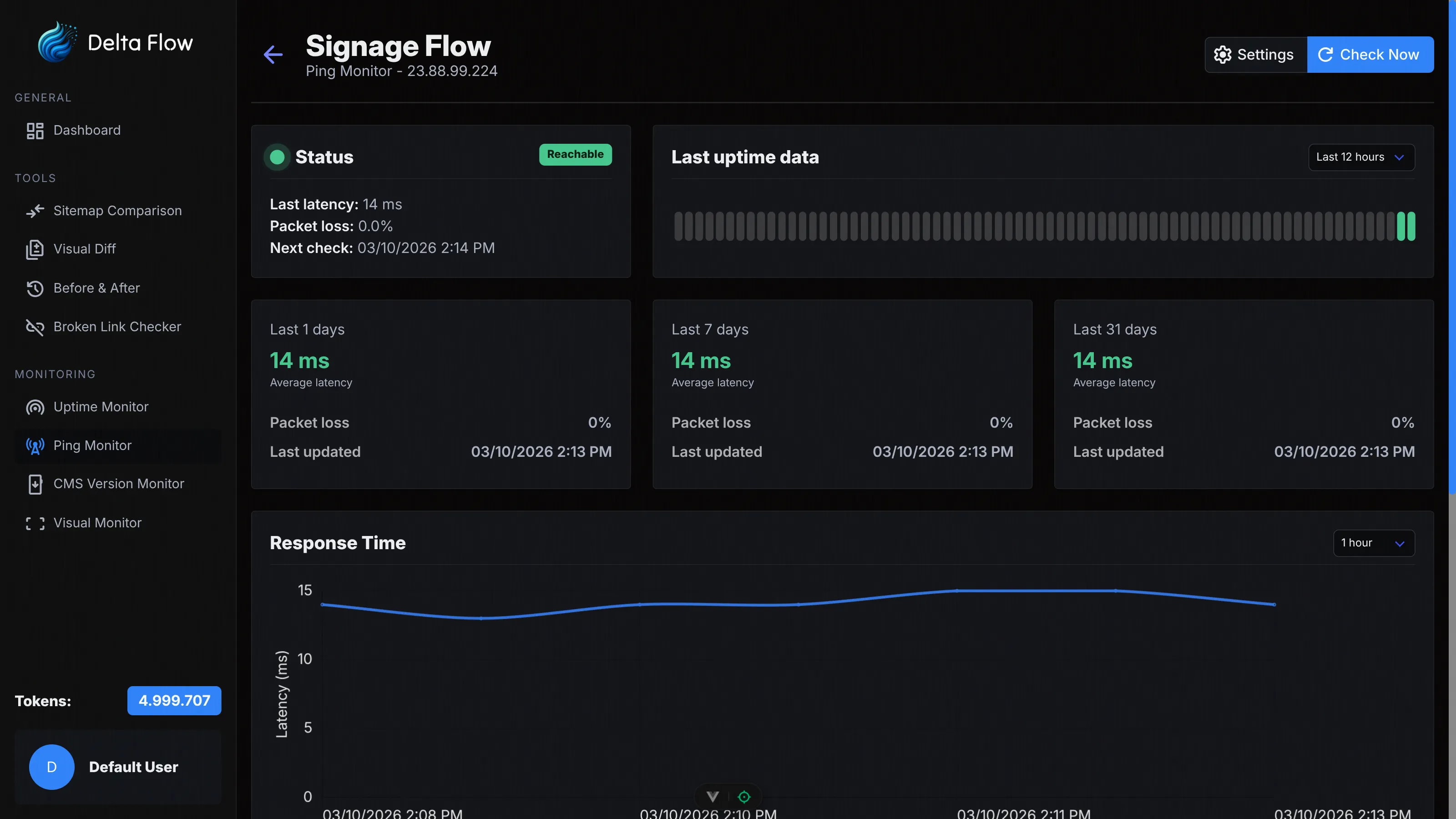
Why Ping Monitor?
The network reachability of your servers is critical for the availability of your services. With our Ping Monitor, you continuously monitor hosts and IP addresses and receive detailed information on latency and packet loss.

ICMP Ping Implementation
Native ICMP packets for precise network measurements. Measure the Round-Trip Time (RTT) and reliably detect packet loss.

Multi-Packet Testing
Configure 1–10 packets per check for more reliable results. Average latency calculation delivers precise measurement values.

Detailed Statistics
Get comprehensive latency charts, packet loss statistics, and historical data for informed network analyses.
Features in Detail
Flexible Configuration
Monitor domain names (e.g. example.com) or IP addresses (e.g. 192.168.0.1). Configure check intervals from 1 to 60 minutes and choose the number of packets per check (1, 3, 5, or 10 packets).

Group Management
Organize your ping monitors in groups for better overview. Create new groups, edit group names, and manage your monitors efficiently. Perfect for monitoring multiple server infrastructures.

Latency Measurement
Measure the Round-Trip Time (RTT) in milliseconds with high precision. View minimum, maximum, and average values in detailed time-series charts for different time periods.

Packet Loss Detection
Detect network issues through packet loss. Our system shows you the percentage of lost packets and helps identify network instabilities.

Availability Statistics
See the availability of your hosts at a glance. The status history shows you the last 12 hours, 24 hours, or 3 days with visual color coding. Calculate the average availability for any time period.

Comprehensive Logs
Keep the complete history of all checks in view. See timestamps, status, latency in milliseconds, packet loss, and details for each individual check. Filter by time period for detailed analyses.

How It Works
Create Monitor
Enter a name and the hostname or IP address. Choose the check interval (1, 5, 15, 30 minutes, or 1 hour) and configure the number of packets per check and the timeout. Your monitor is active within seconds.

Automatic Ping Checks
Our systems automatically send ICMP ping packets at the configured intervals. Each check measures latency and detects packet loss. Notifications are automatically created when outages occur.

Receive Notifications
Get instantly notified by email when a host is unreachable or comes back online. Configure custom email addresses per monitor for flexible notifications.

Analyze Data
Use the dashboard for detailed analyses. View latency charts, packet loss statistics, availability history, and complete logs. All data is available at any time.
Technical Details
ICMP Ping
Native ICMP packets for precise network measurements. No additional protocols or services required – direct network communication.
Configurable Packets
Choose between 1, 3 (default), 5, or 10 packets per check. More packets deliver more reliable results, especially on unstable network connections.

Flexible Timeouts
Choose between 1, 3, 5 (default), or 10 seconds timeout. Adjust the setting to match the expected network latency.
Flexible Intervals
Choose between 1, 5, 15, 30 minutes, or 1 hour. The system automatically calculates the next check time and reliably performs the checks.
Domain & IP Support
Monitor both domain names (e.g. example.com) and IP addresses (e.g. 192.168.0.1). Flexible for all network setups.
Packet Loss Calculation
Automatic calculation of packet loss as a percentage. Detect network instabilities early, before they lead to complete outages.
Choose Your Plan
All plans include access to all monitoring features. The difference lies in the number of monthly tokens and maximum monitors.
Frequently Asked Questions
Ready to Get Started?
Create your first Ping Monitor today and professionally monitor the network availability of your servers.