
Uptime Monitoring
Server availability at a glance – 24/7
Monitor the availability of your websites continuously. Get detailed statistics on response time, incident tracking, and historical availability data for informed decisions.
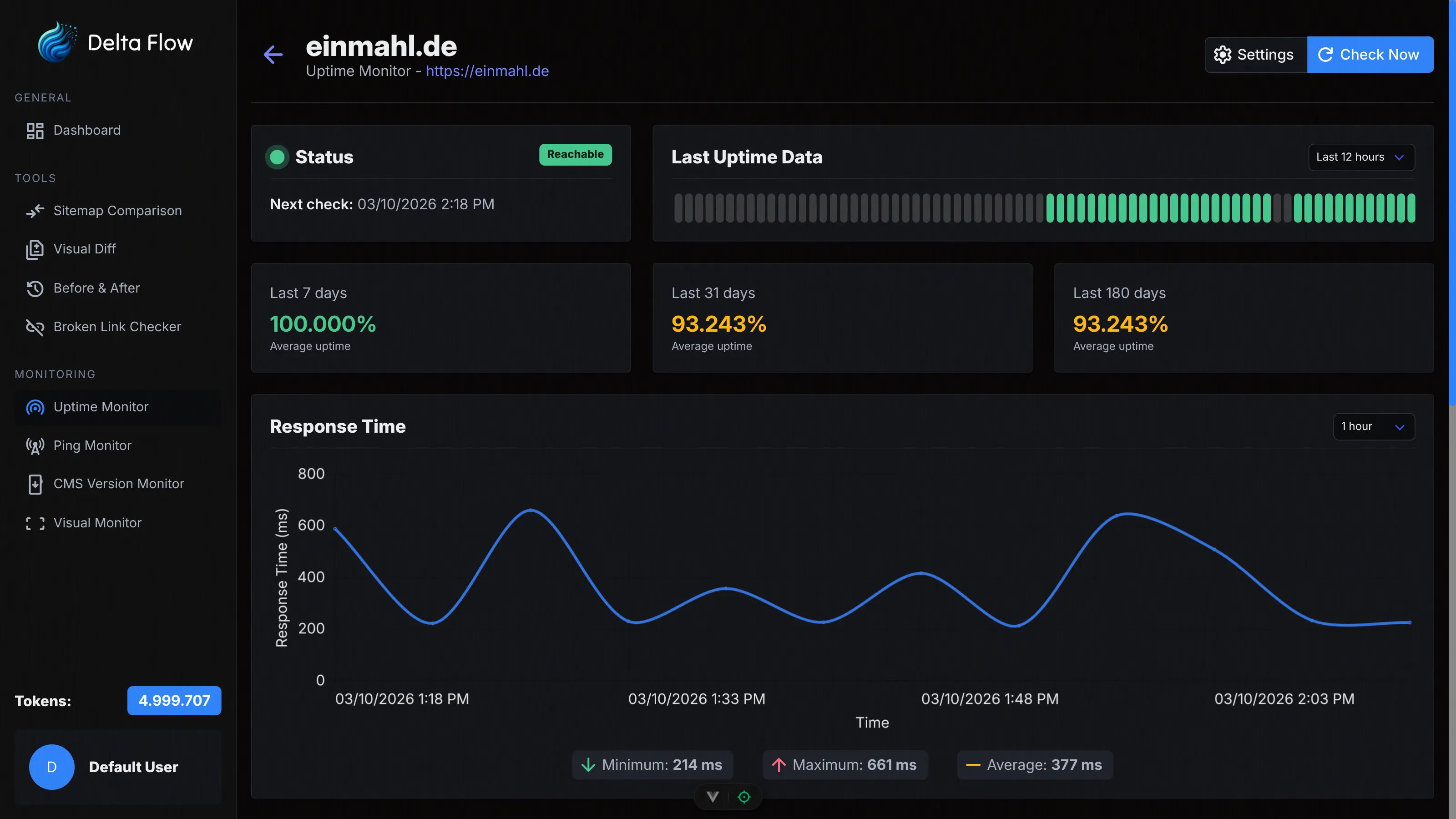
Why Uptime Monitoring?
The availability of your website is critical for the success of your business. With our Uptime Monitor, you receive instant notifications about outages, detailed performance analyses, and comprehensive statistics on server availability.

Instant Notifications
Get notified immediately when your website goes offline. Configurable email notifications keep you always up to date.

Detailed Statistics
Get comprehensive availability statistics, response time charts, and historical data for informed analyses.

Incident Tracking
Automatic detection and documentation of outages with detailed information on duration, cause, and impact.
Features in Detail
Flexible Configuration
Configure check intervals from 1 to 60 minutes, choose different HTTP methods (HEAD, GET, POST, PUT, DELETE), and adjust timeouts to your requirements. Optionally enable Basic Authentication for protected areas.

Group Management
Organize your monitors in groups for better overview. Create new groups, edit group names, and manage your monitors efficiently. Perfect for monitoring multiple projects or clients.

Availability Statistics
See the availability of your websites at a glance. The status history shows you the last 12 hours, 24 hours, or 3 days with visual color coding. Calculate the average availability for any time period.

Response Time Charts
Analyze the performance of your servers with detailed time-series charts. Choose between 1 hour, 24 hours, 7 days, or 31 days. See minimum, maximum, and average values at a glance.
Automatic Incident Tracking
Our system automatically detects outages and groups consecutive errors into incidents. Each incident contains start time, end time, duration, and details on response codes. Perfect for post-mortem analyses and SLA reporting.

Comprehensive Logs
Keep the complete history of all checks in view. Filter by time period (up to 720 hours) and see timestamps, status, response code, response time, and details for each individual check.

How It Works
Create Monitor
Enter a name and the URL of your website. Choose the check interval (1, 5, 15, 30 minutes, or 1 hour) and optionally configure HTTP method, timeout, and Basic Authentication. Your monitor is active within seconds.

Automatic Checking
Our systems perform checks automatically at the configured intervals. Each check measures the response time and verifies the HTTP status. Incidents are automatically created when outages occur.

Receive Notifications
Get instantly notified by email when your website goes offline or comes back online. Configure custom email addresses per monitor for flexible notifications.

Analyze Data
Use the dashboard for detailed analyses. View availability statistics, response time charts, incident history, and complete logs. All data is available at any time.
Technical Details
HTTP Methods
Support for HEAD (default, fastest option), GET, POST, PUT, and DELETE. Choose the method that best suits your application.
Configurable Timeouts
Choose between 5, 15, 30 (default), or 60 seconds timeout. Adjust the setting to match the expected response time of your servers.
Basic Authentication
Optionally enable for protected areas. Configure username and password directly in the monitor. Your credentials are stored securely.
Flexible Intervals
Choose between 1, 5, 15, 30 minutes, or 1 hour. The system automatically calculates the next check time and reliably performs the checks.

Custom Email Recipients
Configure individual email addresses per monitor. This ensures the right people or teams receive instant notifications when outages occur.

Redirect Tracking
The system automatically follows HTTP redirects and checks the final destination status. This allows you to detect issues behind redirect chains.
Choose Your Plan
All plans include access to all monitoring features. The difference lies in the number of monthly tokens and maximum monitors.
Frequently Asked Questions
Ready to Get Started?
Create your first Uptime Monitor today and professionally monitor the availability of your websites.