
Visual Comparison
Direct visual URL comparison
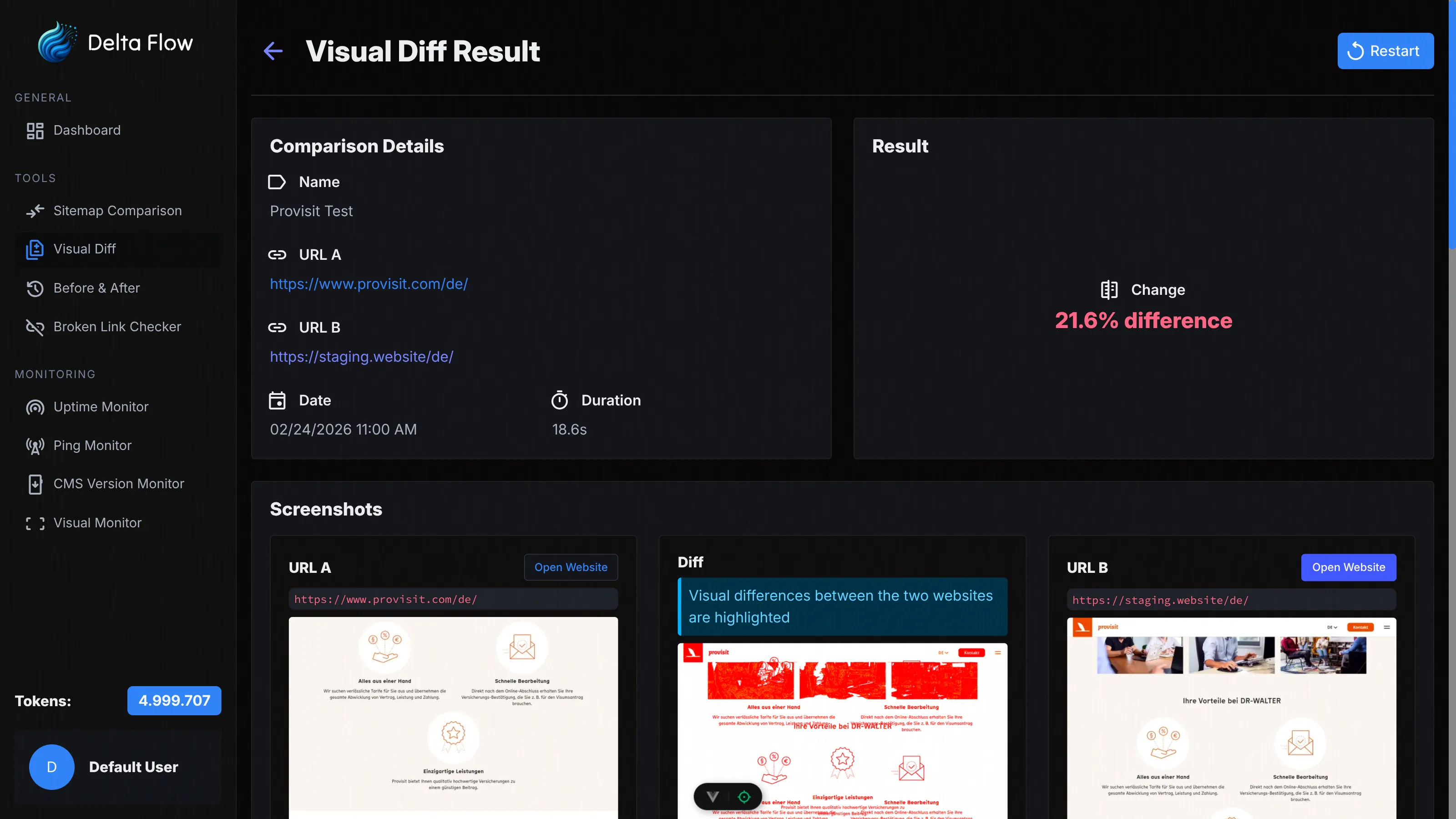
Compare any two URLs directly with each other – without a sitemap. Ideal for quick one-time comparisons of two pages or environments. With interactive image slider and optional AI description of the differences.
Why Visual Comparison?
Sometimes you simply want to quickly compare two URLs with each other – without loading a sitemap or setting up a monitor. The Visual Comparison does this in seconds: enter two URLs, compare, done.

No Setup Required
Simply enter two URLs and start the comparison immediately. No sitemap, no monitor – direct comparison in seconds.

Interactive Image Slider
Slide visually between the screenshots of URL A and URL B. The diff image shows you highlighted exactly where the differences are.

AI Description
Optionally an AI explains in natural language what differs between the two URLs – perfect for quick reports or documentation.
Features in Detail
Compare Two URLs Directly
Enter URL A and URL B – the system automatically creates screenshots of both pages and calculates the pixel-accurate differences. No detour via sitemaps or monitors required.

Basic Authentication
For protected pages you can configure separate Basic Authentication for URL A and URL B. Username and password are stored per URL.

Viewport & Capture Settings
Configure viewport width, height, and device scale factor. Optionally disable JavaScript or block ads and cookie banners for cleaner screenshots.

Interactive Image Slider
The detail view offers an overlay slider for direct comparison of A and B. Additionally you can switch between Screenshot A, Screenshot B, and the diff image.

Repeat Comparison
You can restart a comparison with the same settings at any time – convenient when a page has changed and you want to check the current state.

How It Works
Create Comparison
Enter a name, URL A, and URL B. Optionally configure Basic Authentication, viewport settings, and whether AI descriptions should be generated.

Start Comparison
Click "Compare" – the system automatically creates screenshots of both URLs and calculates the differences. Real-time updates show you the progress.

Analyze Results
Analyze the screenshots, the diff image, and the change percentage. Use the interactive slider for a direct comparison. Optionally receive an AI description of the differences.

Technical Details
Pixel-Accurate Image Comparison
Our algorithm compares screenshots pixel by pixel and calculates a precise change percentage. Even the smallest differences are detected and highlighted.
Automatic Diff Generation
A diff image is automatically generated from the comparison that highlights the differences in color. This lets you see at a glance what has changed.
WebSocket Real-Time Updates
The comparison status is transmitted in real time via WebSocket. You don't need to manually reload the page – results appear automatically as soon as they are available.

Viewport Simulation
Configurable viewport sizes and device scale factors enable consistent screenshots across different screen sizes. Presets for common devices are available.
Basic Authentication
Separate credentials for URL A and URL B. Username and password are stored per URL and securely transmitted.
Ad Blocker & Filters
Optionally block ads, cookie banners, and interfering elements via CSS selectors for clean, consistent screenshots without distractions.
Choose Your Plan
All plans include access to all tools. The difference lies in the number of monthly tokens and maximum monitors.
Frequently Asked Questions
Ready to Get Started?
Compare two URLs today and see at a glance what differs between them.